Cloud Security AI Scan: Quick AWS security & billing scan from the CLI
One prompt, not a runbook
I wanted a quick, read-only assessment of an old AWS account without running each aws command myself. I gave Claude Code one prompt and let it make the read-only calls.
The AWS CLI was already authenticated with a short-lived token.
Do a read-only security and billing sanity-check on my AWS ap-southeast-1
account using awscli.

Only read state — do not change anything.

Then triage: what must I fix now vs. configure later.
That was the entire scan. The findings below came from the agent’s calls, not commands I entered individually.
Findings
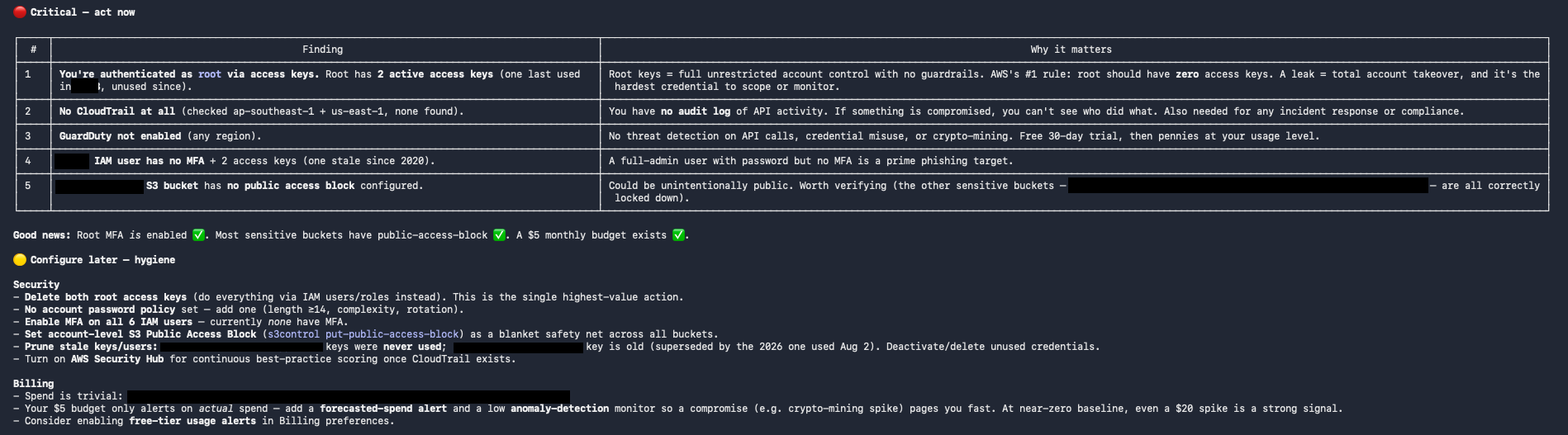
A scan’s triaged output: critical items to fix now, then hygiene to configure later. Account-specific details are redacted.
Fix now — issues that could enable access or leave activity unaudited:
- Root has access keys → delete them; operate via IAM users/roles.
- No CloudTrail → create a multi-region trail so I have an audit log.
- GuardDuty off → enable it (30-day free trial, then cheap at low usage).
- Admin/privileged IAM user without MFA → enforce MFA.
- A sensitive bucket missing its public-access block → set one.
Configure later — controls that reduce risk over time:
- Set an account password policy (length, complexity, rotation).
- Enable MFA on all IAM users, not just the admins.
- Set the account-level S3 public-access block as a blanket safety net.
- Deactivate and delete never-used or stale access keys.
- Add a forecasted-spend budget alert and a low cost-anomaly monitor. With a near-zero baseline, even a small spike, such as cryptomining activity, is a strong signal.
The findings were correct and ordered by urgency. I had a short list of what to fix first.
Gotchas
- CloudTrail and GuardDuty are per-region. A clean result in one region says nothing about the others — tell the agent to include
us-east-1, where many global events land. - Cost Explorer API calls have a per-request charge. It is negligible for a one-off scan but worth considering before running one in a loop.
- I run it as an IAM user, not root. If my only working credential is a root access key, that is the first thing I need to fix.